
道場TOP ネタ一覧 shoppq道場
I’ve held onto my ASUS UX305UA for four years—I just couldn’t bring myself to replace it
- ◇評価 0ポイント
- ◇閲覧回数 4回
- ◇登録日
- 2026年10月16日
-
- aline
- 道場主
Lv.24
In the summer of 2016, I saw an ASUS UX305UA in person for the first time at a computer mall in Mong Kok, Hong Kong. I had spent months reading online reviews, weighing it against the Lenovo Xiaoxin Air 13. Ultimately, I made my decision based on a single comment claiming that the initial batch of Xiaoxin Air 13 units suffered from poor build quality. Looking back, that was a rather hasty reason to choose—but that’s how shopping goes sometimes: one negative review can instantly wipe away all the goodwill you’d built up.
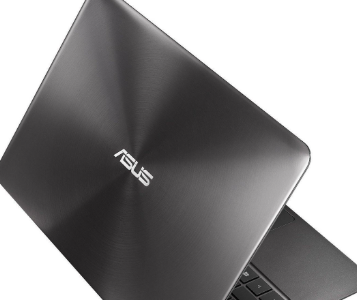
As I left the store, box in hand, it was raining—a steady, moderate downpour. I tucked the box under my arm and sprinted for two blocks before finding shelter. A small corner of the box got wet, and I felt genuinely distressed. It’s funny to think about now—why get so worked up over a computer that cost just over 3,000 yuan?
The Novelty of the First Week
The UX305UA was an upgrade to the UX305CA; it swapped the Core M processor for a Core i5-6200U, while the screen resolution was dialed back from QHD to 1080p—a detail I didn’t even notice at the time, as I was too focused on the "i5" and "8GB" specs. The device weighed 1.3 kg and measured 1.6 cm in thickness. The lid featured a dark, near-black brushed metal finish that took on a cool-toned sheen when light hit it. In the hand, the machine felt, in a word: solid. There was none of that flimsy, cheap-plastic sensation; the transition between the metal surfaces on the top (A-side) and bottom (D-side) was clean and precise.
The ports were distributed along the left and right sides: two USB 3.0 ports and an SD card slot on the left, with the power jack, another USB 3.0 port, a mini HDMI port, and a headphone jack on the right. While there was no built-in Ethernet port, ASUS included a USB-to-Ethernet adapter in the box—a thoughtful touch. I’m still using that same adapter today, even though I’ve since gone through three other computers. Then there’s the fan.
Around the third month of use, the fan started making an odd noise—not a constant hum, but rather an occasional "click" or "clunk," as if something were caught in the blades. It was particularly noticeable in quiet environments; people sitting next to me in the library would even look up. I looked into it and found that this wasn't an isolated case—other users reported similar strange noises after about two years of use.
To be honest, this issue was never fully resolved. I once opened the laptop to clean out the dust, which helped for about two months, but then the noise returned. ASUS opted for an active cooling system—a single fan paired with a single heat pipe—which, in theory, should be sufficient to manage the heat from an i5-6200U processor. A review by PChome claimed that temperatures could be kept under 60°C even under full load; while I trust that figure, I’m far less confident in the durability of the fan itself. Reviews from that period noted that the fan was "rather noisy"—a polite way of putting it.
The most absurd issue, however, concerned waking the device from sleep. There were times when I’d close the lid and tuck the laptop into my bag, only to find the screen completely black upon opening it again. It wouldn't respond to any input, forcing me to perform a hard shutdown by holding down the power button. A user on Amazon described the exact same problem, noting that "every time it goes to sleep, I have to perform a hard reset—and any unsaved work is lost." A BIOS update eventually mitigated this, though it still happens occasionally. Consequently, I’ve developed a habit: before closing the lid, I always press "Win+L" to lock the screen. While this might not be directly related to the sleep-wake issue, it at least gives me some peace of mind.
Display and Keyboard
The 1080p matte IPS display is the feature I’m most satisfied with. It uses an AU Optronics panel with impressive color accuracy for this price point; it’s glare-free for outdoor use and doesn't cause eye strain, even during long periods of viewing. While the contrast isn't particularly high—blacks tend to look a bit grayish—it’s perfectly adequate for daily office tasks and watching videos. As for "narrow bezels"—well, they don't really exist here. Both the top and bottom bezels are quite thick, making the device look like a relic from a bygone era by today’s standards. Still, that was the norm for 3,000-yuan ultrabooks back then, so there’s really nothing to complain about. The keyboard is of the "chiclet" (island-style) variety—soft, with a relatively short travel distance and moderate tactile feedback. It’s fine for casual typing, but if you’re powering through two or three thousand words at a stretch, your finger joints start to feel the strain. There’s no backlighting, which is genuinely inconvenient in low-light conditions—a drawback frequently highlighted in reviews of this model. The trackpad isn't particularly large; while it tracks movement well, it requires a firm press to register a click—sometimes it wouldn't even respond despite my pressing down. Consequently, I developed the habit of using a two-finger tap for a left-click—a habit that has stuck with me to this day; I still find myself doing it instinctively on other computers.
The battery life is genuinely impressive.
It houses a 56Wh battery, with an official rating of 12 hours. In my own testing—with brightness set to 60%, Wi-Fi enabled, and while writing documents or browsing the web—it lasts about 7 to 8 hours. While that falls short of the official claim, it’s quite good given the device's size and weight. Other users have noted a "7-hour maximum," which aligns with my own experience. It also supports "USB Charger+," allowing it to charge a phone even when powered off—a feature that has saved me more than once while traveling.
It’s not perfect, but you get used to it over time.
By 2020, this machine had been with me for four years. During that time, I only replaced the SSD—the original 256GB drive simply wasn't enough—and left everything else as is. The 8GB of DDR3 RAM is soldered onto the motherboard and cannot be upgraded; I knew this when I bought it—a classic case of "if you can't live with it, don't buy it; if you buy it, don't complain."
By today’s standards, the performance is certainly lackluster. With an i5-6200U processor and integrated HD 520 graphics, it starts to struggle when you have a dozen or so Chrome tabs open. Yet, it has never completely given up on me. It has never suffered a "blue screen of death," developed bad sectors on the drive, or shown lines on the display. The fan might be noisy, but it has kept on spinning.
I’ve since bought a new computer, and the UX305UA has been relegated to a secondary role, sitting in the living room as a backup device. Even now, if I’m sitting on the sofa in the evening and need to reply to an email, I’ll still reach for it. The soft, tactile feel of the keyboard, the "two-finger click" gesture on the touchpad, the non-reflective matte finish of the screen—everything is so familiar that you never stop to consider what might be wrong with it.
I still have that machine today. There are a few faint scratches on the lid, but the deep blue of its exterior still looks striking under the light. It’s not a "classic" model; few people would ever bother writing an article to reminisce about it. Yet, for me, it is a computer that is simply "good enough"—and achieving that state of being "good enough" is far more difficult than one might imagine.
ASUS 4800mAh 11.55V C31N1539 Battery for ASUS ZenBook UX305UA
|
|
【キーワード】
登録されていません
|

|
  |
ブログ? そんなの必要ありません! 今日から、いきなりアフィリエイトスタート!
【まにあ道アフィリエイト】まにあ道ならAmazonアソシエイトIDを利用してネタを書くだけで、お気軽に始めていただけます。


-

-
 I’ve held onto my ASUS UX305UA for four years—I just couldn’t bring myself to replace it(0)
aline
(道場主)
I’ve held onto my ASUS UX305UA for four years—I just couldn’t bring myself to replace it(0)
aline
(道場主)
-
-
New battery L22C4PA1 L22D4PA1 4493mAh/69WH 15.36V for Lenovo Yoga 7 14ARP8/14IRL8 16IRL8(0)
aline
(道場主)





 シュリのおすすめネタ
 この道場の人気ネタ
-
What is the current standing of Motoro... -
New battery 178110866 5000mAh/19Wh 3.... -
New battery LT25H426271B 2500mAh/9.625... -
New Battery Laptop Batteries LENOVO 11... -
New Battery Surveying Equipment Batter...
このネタをソーシャルブックマークに登録する
 まにあ道の人気ネタ
-
「ワンピースレストラン バラティエ」のメニューをルフィ&ウソップ&サンジの声... -
リクガメ 甲羅の病気 ~甲羅が赤いときの原因は?~ -
獅王Pair與白兔牌痘痘藥有類固醇嗎?完整解答你... -
【イベントレポ】格闘技大会「公武堂ファイト」に まにあ道が乱入! -
Chargeur Ultraléger pour Acer Swi...
コメントはまだありません。