
道場TOP ネタ一覧 shoppq道場
Dell Latitude 9510 N7HT0: A Keyboard That Divides Opinion—Too Soft
- ◇評価 0ポイント
- ◇閲覧回数 7回
- ◇登録日
- 2026年10月22日
-
- aline
- 道場主
Lv.24
If you search for the model suffix "N7HT0," you’ll find very few results; even Dell rarely mentions it. It is, in fact, a specific SKU from the 2020 Latitude 9510 2-in-1 lineup, featuring an i7-10810U processor, 16GB of RAM, a 512GB SSD, and a 15.6-inch FHD touchscreen. Yet, this obscure code hides an interesting quirk: while Dell originally positioned it as a "laptop for traveling executives," it gained fame for an entirely different reason—its massive 88Wh battery. In his review for *The Verge*, the editor opened by saying, "This laptop gave me a sore neck"—simply because the battery life was so long that he couldn't complete his standard rundown test; the machine just wouldn't run out of power. *PCMag* was even more direct, clocking it at 20 hours and 47 minutes—a figure that speaks for itself.
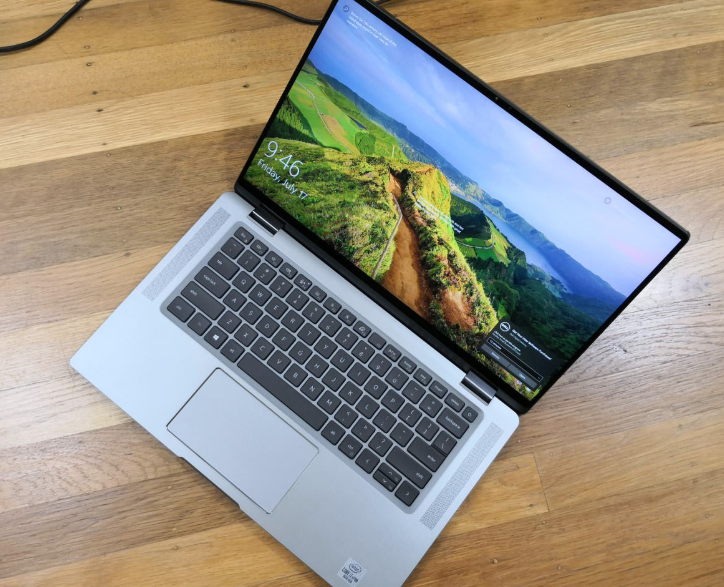
Looking at the second-hand market today, that exceptional battery life takes on a new significance. On the Chinese platform Xianyu, the i7 touchscreen model is currently listed for anywhere between 3,300 and 3,900 RMB, while on eBay or through Australian refurbishment channels, it has even sold for the equivalent of 2,000 to 3,000 RMB. For the price of a mid-range, modern, lightweight laptop, you get a CNC-machined aluminum chassis, a 15.6-inch display with ultra-thin bezels on all four sides, a glass trackpad, and a keyboard that *The Verge* once hailed as "one of the best of the year." The keyboard itself is a point of contention: a reviewer at *ZDNet* described it as "squishy"—a bit too soft—whereas the editor at *The Verge* found the smooth bottoming-out and crisp rebound genuinely addictive. He noted that while his typing speed actually slowed down slightly, the experience was simply comfortable. There is no objective "right" answer here; you’ll have to type a couple of hundred words yourself to decide which side you’re on. The screen is the most "2020-era" component of this machine. With a 1920×1080 resolution, 16:9 aspect ratio, 400 nits of brightness, 100% sRGB coverage, and touchscreen support for a stylus, the specs were respectable for the time. However, Dell never offered a 4K option—a point specifically highlighted as "disappointing" in a review by PCMag. The aspect ratio is even more peculiar: while a 15.6-inch 16:9 display is great for watching movies (minimizing black bars), the device feels awkward to hold when oriented vertically as a tablet, given its elongated, narrow shape. Dell marketed it as a "15-inch screen in a 14-inch chassis"—measuring 0.55 × 13.4 × 8.5 inches. The 2-in-1 model, equipped with an 88Wh battery, weighs approximately 1.68 kg—significantly heavier than a 1.1 kg-class machine like the ThinkPad X1 Carbon. It’s certainly portable enough for a daily commute, but you’ll have to get used to the extra weight—roughly equivalent to carrying an additional bottle of water in your bag.
What might truly deter some potential buyers, however, is the performance. The i7-10810U is a six-core Comet Lake processor; while the name sounds impressive, stress testing by Notebookcheck reveals its true limitations. Under a Prime95 load, it sustains 4GHz for only about ten seconds before hitting 96°C and throttling down to 3.2GHz. From there, it fluctuates between 1.2GHz and 2GHz, with temperatures oscillating between 57°C and 68°C. For tasks like word processing, video conferencing, or keeping a dozen browser tabs open, the device remains quiet—the fans are barely audible, and the center of the keyboard gets warm but not uncomfortably hot. However, if you push it to perform sustained tasks like compiling code or exporting video, it will quickly throttle, effectively signaling: "This isn't what I was built for." This isn't a failure of Dell’s thermal design, but rather an inevitable outcome for that generation of processors when housed in such a thin chassis—something any second-hand buyer should keep in mind. There’s little to complain about regarding the ports. You get two Thunderbolt 3 ports, one USB-A port, HDMI 2.0, a microSD card reader, and a headset jack; there’s an optional SmartCard slot on the left and a wedge-shaped lock slot on the right. Looking back from 2026, two Thunderbolt 3 ports might not seem particularly fast by today’s standards, but the inclusion of USB-A and HDMI—meaning you don’t have to scramble for a dongle just to plug in a mouse or connect to a projector—provides a welcome sense of reliability. The quad-speaker, top-firing audio system earned praise from both PCMag and ZDNet; it delivers clear, intelligible vocals for meetings—far better than the "as long as it makes noise" quality found in many other laptops. The webcam includes an IR sensor, powering the "ExpressSign-In" feature—which wakes the system as you approach and locks it when you walk away. It was a novel concept back then, and it remains convenient today—provided you don’t mind the screen occasionally lighting up just because you happened to walk by.
There’s also something tucked away in the system that second-hand buyers often overlook: Dell Optimizer. It’s not a performance booster, but rather a background manager that fine-tunes power policies and audio configurations. It learns which applications you use most frequently and tracks your charging habits—switching between AC power and battery—to make subtle adjustments. You’ll hardly notice it’s there, but if you perform a clean OS install and wipe all the Dell software, you might find that your battery life and audio performance don’t quite match the original review benchmarks. It’s not that the software is magical; it’s simply that the hardware and software are tightly integrated. If you’re buying second-hand, it’s best to ensure the factory recovery partition or the original driver package is still intact.
So, for a price in the neighborhood of 3,000 RMB, what you’re getting is a 15-inch touchscreen that still holds its own today; a keyboard that you’ll need to test for yourself to see if it suits your taste; a battery that can effectively banish "low-battery anxiety" from your mind; and a thermal design that—when pushed by a six-core U-series processor—will honestly let you know exactly where its limits lie. The 16GB of LPDDR3 RAM is soldered on and cannot be upgraded, and there is only a single M.2 slot for storage—you’ll have to decide for yourself whether 512GB is enough for your needs. It doesn’t quite fit the expectation of a "buy-it-once-and-it-does-everything-for-five-years" machine. However, if you know that you’ll mostly be spending your time in a web browser, Office applications, and video calls—with the occasional flip of the screen to scroll through a PDF—then this 9510 (a model name easily lost in the shuffle) is a solid choice; its second-hand price already accounts for its shortcomings.
DELL 88Wh /7334mAh 11.4V TVKGH Battery for Dell Latitude 9510 2-in-1 N7HT0 0HYMNG 089GNG
|
|
【キーワード】
登録されていません
|

|
  |
ブログ? そんなの必要ありません! 今日から、いきなりアフィリエイトスタート!
【まにあ道アフィリエイト】まにあ道ならAmazonアソシエイトIDを利用してネタを書くだけで、お気軽に始めていただけます。


 Dell Latitude 9510 N7HT0: A Keyboard That Divides Opinion—Too Soft(0)





 シュリのおすすめネタ
 この道場の人気ネタ
-

New Battery Lithium-Ion Batteries TADI... -
New battery IBR009NA 5000mAh/19Wh 3.8V... -
Lenovo Yoga 7 Pro-13IKB: Handling the ... -
New Battery Tablet PC Batteries FUJITS... -
High-compatibility battery EN-EL18 EN-...
このネタをソーシャルブックマークに登録する
 まにあ道の人気ネタ
-
ディオールシャネル Iphone duo 18 pro maxブランドケース... -
Msi ADP-400CB-B 400W 互換用ACアダプター Msi Ra... -
New PHILIPS VTR2000PRO Compatible Batt... -
CMLI1X3N001A COMEN CMLI1X3N001A Batter... -
Batería NEWMINE MG584463 para New...
コメントはまだありません。