
TOP > コンピュータ > ノートPCバッテリー道場 > ネタ
道場TOP ネタ一覧 ノートPCバッテリー道場
Huawei MateBook D 2018 (PL-W19) Review: A Mismatched Configuration Behind a Large 15.6-inch Display
- ◇評価 0ポイント
- ◇閲覧回数 15回
- ◇登録日
- 2026年10月17日
-
- ellabattery
- 道場主
Lv.25
On Huawei’s official support page, the model number "PL-W19" actually refers to a 2017 version equipped with an Intel Core i5 processor and a 1TB mechanical hard drive. However, the "2018" version—which uses the same chassis—retains much of the original design, merely swapping in an 8th-generation Intel Core processor and upgrading the graphics from an NVIDIA GeForce 940MX to an MX150. Consequently, if you come across a "2018 PL-W19" today, it likely features an i5-8250U or i7-8550U processor, an MX150 GPU, 8GB of RAM, and a storage configuration consisting of either an SSD alone or a hybrid setup (SSD plus a mechanical hard drive).
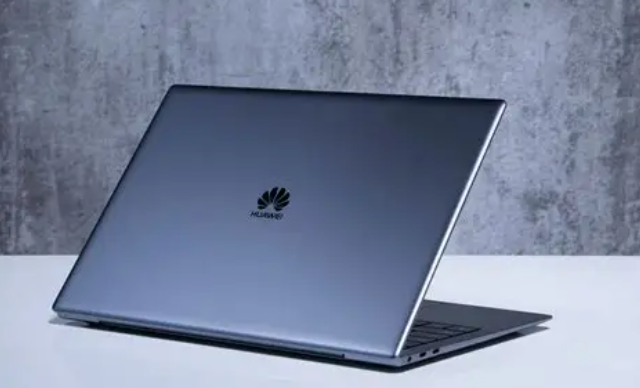
The first thing you notice when holding this device is its weight—and it’s not the kind of weight that conveys solid, premium build quality. At 1.9 kg and 16.9 mm thick, the dimensions aren't necessarily extreme, but carrying it in a bag feels like lugging around a brick; even moving it one-handed from a desk to a bed feels like a chore. While the metal lid (A-side) feels decent and the edges are finished cleanly, opening the laptop with one hand is a real workout for your fingers. The hinge tension is set so tight that if you try to lift the lid by a corner, the base stays firmly planted—you have to hold down the keyboard deck (C-side) with your other hand just to open it.
Once opened, the display proves to be the most awkward aspect of the machine. On paper, the 15.6-inch 1080p screen—with its 6.2 mm narrow bezels and 83% screen-to-body ratio—sounds impressive. The bezels are indeed thin, which makes for a sleek look when watching movies (minimizing the black bars at the top and bottom), but the color gamut is a mere 45% NTSC. It’s perfectly fine for casual tasks like streaming videos or browsing Bilibili, but the moment you try to edit photos, the colors go haywire—shifting into ambiguous, off-kilter hues that look completely different from what you’d see on a smartphone screen. The display has a rated brightness of 350 nits, but in practice, it looks somewhat gray. While the matte, anti-glare coating is a plus, it comes at the cost of reduced clarity—using it near a window during the day feels like looking through a thin veil. Even more frustrating is the lack of keyboard backlighting; typing in the dark means relying solely on the light from the screen to locate the keys—a dealbreaker for anyone accustomed to backlit keyboards.
The keyboard feels mushy, lacking crisp tactile feedback; pressing the keys is like pushing into rubber, which leads to finger fatigue during extended typing sessions. The touchpad surface is smooth, but the click mechanism is vague—often requiring multiple attempts to confirm whether a press or drag action has actually registered. In terms of ports, the device relies entirely on legacy standards: two USB-A 3.0 ports, one USB-A 2.0 port, an HDMI port, and a headphone jack—with no USB-C ports to be found. Today, this means that if you want to use a docking station, you’ll need a specific USB-A adapter cable. You also can’t share a fast-charging brick with your phone, forcing you to always carry the laptop’s own dedicated charger in your bag.
Thermal management is a major shortcoming. A single fan is positioned toward the right side; it remains idle during light tasks like web browsing or document editing, but as soon as you run something more demanding, it jumps straight from silent to "helicopter mode"—so loud that even wearing headphones won't drown it out. To make matters worse, the heat distribution is uneven: the left palm rest and the area near the hinge become hot to the touch, while the right side stays only lukewarm—a temperature difference you can clearly feel while typing. When playing *League of Legends* at maximum settings, it manages around 70 FPS, but the frame rate drops during team fights, the fan kicks into overdrive, and the area around the WASD keys begins to heat up. If you try to run more demanding games, it’s barely playable at medium settings and only stable at low settings—provided, of course, that you can tolerate the noise. The battery has a capacity of 43.3 Wh. While the official spec claims about 8.5 hours of continuous video playback, the real-world performance is lower—expect around 5 to 6 hours. However, once you open a few web browser tabs, keep WeChat running in the background, and add a couple of other tasks, the battery drains noticeably fast. It comes pre-installed with Windows 10 Home; although Huawei offers a free upgrade to Windows 11, running the new OS on an 8th-gen Intel Core processor is a far cry from a smooth, pleasant experience.
For those still using this PL-W19 model, the main appeal lies in its large screen and the decent, all-metal chassis. It’s perfectly capable of handling basic tasks like document editing or watching videos. That said, you have to live with its heavy weight, a display with a limited color gamut, the lack of a backlit keyboard, outdated ports, and a cooling fan that gets loud the moment the workload increases. Plus, as with any device that’s several years old, you’re bound to face issues like battery degradation and dust accumulation. It’s not the kind of machine that grows on you the more you use it; rather, it’s like an aging, reliable-enough companion—you’re well aware of all its flaws, but you just haven’t found a compelling enough reason to replace it yet.
Huawei 11.4V 3700mAh/42.2Wh HB46K497ECW Replacement Battery For Huawei Matebook D 2018 PL-W19
|
|
【キーワード】
登録されていません
|

|
  |
ブログ? そんなの必要ありません! 今日から、いきなりアフィリエイトスタート!
【まにあ道アフィリエイト】まにあ道ならAmazonアソシエイトIDを利用してネタを書くだけで、お気軽に始めていただけます。


-

-
 Huawei MateBook D 2018 (PL-W19) Review: A Mismatched Configuration Behind a Large 15.6-inch Display(0)
ellabattery
(道場主)
Huawei MateBook D 2018 (PL-W19) Review: A Mismatched Configuration Behind a Large 15.6-inch Display(0)
ellabattery
(道場主)





 シュリのおすすめネタ
 この道場の人気ネタ
-
Buy HUAWEI HB351731EFW Smart Watch Bat... -
Buy TOSHIBA PA3450U-1BAS Laptop Batter... -
Buy XIAOMI IBR009NA Lithium-Ion Batter... -
Buy SANYO UR18500Y SANYO 3.7V 1300mAh/... -
Buy RECENT RB-35 RECENT 7.4V 1150mAh/...
このネタをソーシャルブックマークに登録する
 まにあ道の人気ネタ
-
Aankoop PHILIPS VTR2000Pro Compatibele... -
もののけ姫 サンのお面の作り方 材料と製作過程などまとめ! -
Producto compatible de BLACKVIEW LI536... -
ULEFONE UF1103 8800mAh/33.44Wh 3.8V Li... -
LENOVO L240BAT-3-55 4650mAh/55Wh 11.61...
コメントはまだありません。