
TOP > コンピュータ > ノートPCバッテリー道場 > ネタ
道場TOP ネタ一覧 ノートPCバッテリー道場
ThinkPad P15v Gen 1: A Practical Choice for Entry-Level Mobile Workstations
- ◇評価 0ポイント
- ◇閲覧回数 6回
- ◇登録日
- 2026年8月19日
-
- ellabattery
- 道場主
Lv.24
In the mobile workstation market, the ThinkPad P series has always been known for its stability, professionalism, and numerous ISV certifications. However, for many small and medium-sized enterprises, design studios, and individual professional users, flagship models like the P15 and P17 are too expensive and may not be suitable for their first professional workstation on a limited budget. Therefore, Lenovo launched the "v" suffix Value series—the ThinkPad P15v Gen 1.
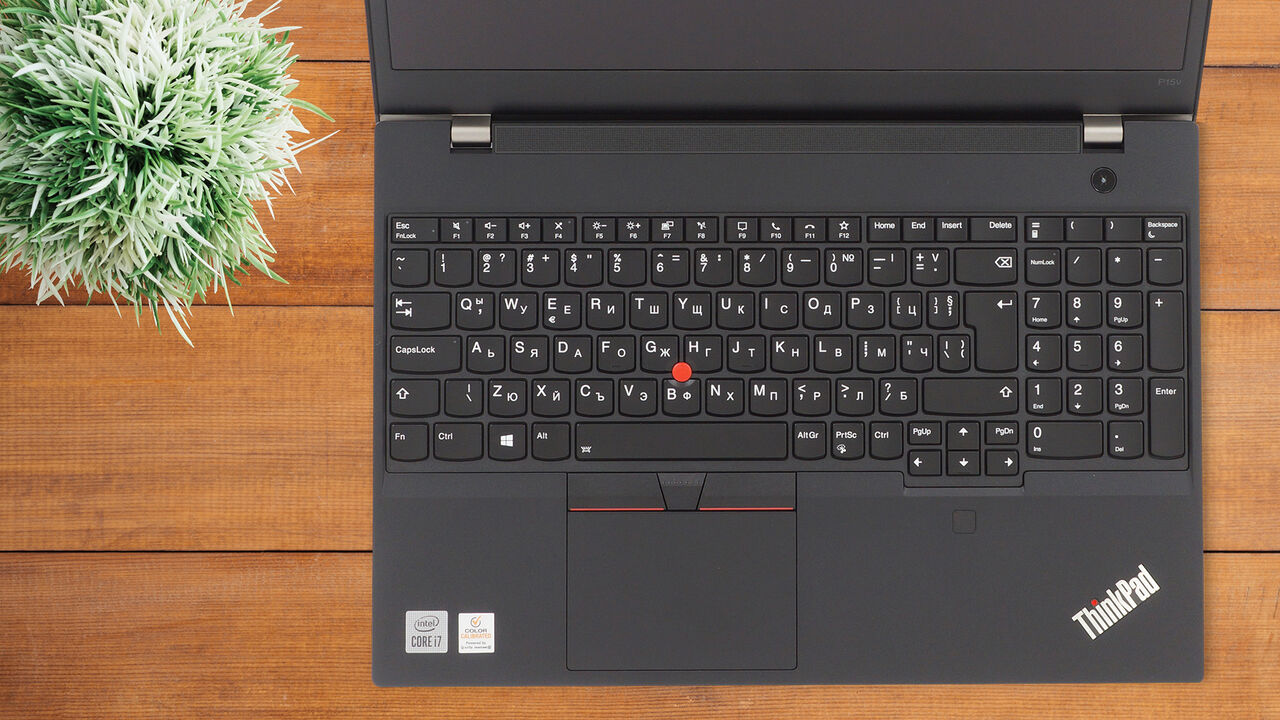
It retains the core genes of a professional workstation: ISV certification, a Quadro professional graphics card, good expandability, and the classic ThinkPad keyboard, while being more affordable. This article will discuss who this machine is best suited for from the perspectives of product positioning, configuration, actual experience, and applicable cases.
I. Product Overview: What is the positioning of the P15v Gen 1?
Released around 2020, the ThinkPad P15v Gen 1 is positioned as an "entry-level mobile workstation," primarily targeting:
Designers in architecture, engineering, and manufacturing;
Professional users who need to run CAD/BIM/CAE software;
Engineering students and researchers in universities;
Small and medium-sized enterprises with limited budgets who are unwilling to sacrifice stability.
Its core philosophy is clear: it doesn't pursue top-tier performance, but rather focuses on providing the stability, compatibility, and scalability that professional users need most.
II. Core Configuration Overview
Taking a common recommended configuration as an example:
Processor: Intel 10th Gen Core i7-10750H / i5-10300H, Xeon W-10855M optional in some markets;
Graphics Card: NVIDIA Quadro P620, 4GB GDDR5 VRAM;
Memory: 2 DDR4 SODIMM slots, supports up to 64GB;
Storage: M.2 PCIe NVMe SSD, 512GB/1TB/2TB optional;
Screen: 15.6-inch, FHD IPS or 4K UHD high color gamut screen optional;
Ports: USB-A, USB-C/Thunderbolt 3, HDMI, RJ45 Ethernet port, SD card reader, headphone/microphone jack, etc.;
Weight: Approximately 2.1kg;
Battery: Approximately 68Wh, supports fast charging.
On paper, the Quadro P620 isn't a high-performance card, even significantly lagging behind contemporary gaming cards like the GTX 1650. However, its value lies not in benchmark scores, but in the software stability and professional driver optimization afforded by ISV certification.
III. Design and Build Quality: The Familiar ThinkPad Feel
The P15v Gen 1 continues ThinkPad's classic black, square design. The A-side features a TrackPoint (red dot) indicator, while the C-side houses the iconic keyboard and TrackPoint. The keyboard feel remains a traditional ThinkPad strength, with a long key travel and clear rebound, making it comfortable for extended periods of inputting engineering parameters and writing reports.
The chassis is slightly thicker than typical ultrabooks, reflecting the need to accommodate a professional graphics card and cooling system. Weighing around 2.1kg, it's within the normal range for a 15.6-inch mobile workstation, suitable for commuting in a bag, but not as lightweight as an ultrabook.
The interface options are comprehensive, with the RJ45 Ethernet port proving invaluable in environments with unstable Wi-Fi, such as engineering sites and labs. The SD card reader is also user-friendly for photographers and designers, allowing direct reading of camera memory cards.
IV. Performance and ISV Certification: Stability is More Important than Benchmarks
One of the biggest selling points of the P15v Gen 1 is its ISV certification. It has passed certification tests for numerous professional software programs, including AutoCAD, Revit, SolidWorks, Creo, ANSYS, and MATLAB.
What does this mean?
While ordinary gaming graphics cards may achieve high benchmark scores, they may experience display errors, driver crashes, and abnormal model rendering in professional software. Quadro series professional cards, coupled with certified drivers, ensure maximum software stability.
For example, the Quadro P620 performs adequately in scenarios such as AutoCAD 2D/3D drawing, light to medium-weight Revit modeling, and SolidWorks part assembly. While 4GB of video memory isn't large, it's sufficient for many entry-level and medium-sized projects. However, when dealing with large assemblies, complex rendering, or deep learning training, the P620 will struggle.
V. Case Study 1: Mobile BIM Terminal for an Architectural Design Firm
Background: A mid-sized architectural design firm with a team of approximately 20 people primarily uses Revit, AutoCAD, and SketchUp for architectural design and construction drawing refinement. Previously, when designers went out to communicate with clients, they used ordinary consumer-grade laptops, frequently encountering problems such as slow Revit model opening, driver crashes, and drawing export failures.
Selection: The company purchased six ThinkPad P15v Gen 1 laptops, configured with i7-10750H processors, 32GB of RAM, 1TB SSDs, Quadro P620 processors, and 4K high color gamut screens.
Actual Experience:
Designer Zhang was responsible for the BIM model of a mid-sized commercial complex project; the Revit file size was approximately 180MB. On the P15v Gen 1, the model panning and zooming were generally smooth at medium display resolution, and the speed of switching views and exporting DWG drawings was significantly faster than with the previous consumer-grade laptops. More importantly, during on-site communication with the client, the 4K high color gamut screen displayed material details, line width settings, and detailed annotations with exceptional clarity, avoiding misunderstandings caused by screen color differences.
Mr. Zhang said, "I used to dread opening Revit on-site, but now at least it doesn't freeze or crash suddenly. The P15v Gen 1 isn't fast, but it's very stable."
Summary: For small to medium-sized design teams primarily using Revit and AutoCAD, the P15v Gen 1 provides a reliable mobile office experience, especially with ISV certification, significantly reducing software crash rates.
VI. Case Study 2: Simulation and Modeling Equipment in a University Engineering Laboratory
Background: A university's mechanical engineering laboratory needed to equip graduate students with computers for SolidWorks modeling, MATLAB simulation, and ANSYS lightweight analysis. The budget was limited, but the equipment needed to be stable, durable, and easy to maintain.
Selection: The lab purchased eight P15v Gen 1 laptops, configured with i7-10750H processors, 16GB of RAM, 512GB SSDs, Quadro P620 graphics cards, and FHD IPS screens.
Real-world experience:
Graduate student Xiao Li's main research area is mechanism motion simulation. He routinely uses SolidWorks for part modeling and assembly design. The P15v Gen 1 performed stably when opening assemblies containing hundreds of parts. SolidWorks RealView graphics displayed correctly, and there were no broken surfaces or texture errors when rotating the model. Xiao Li also tried upgrading the RAM to 32GB, and the performance was significantly improved compared to the original laptop with 16GB of RAM when running medium-scale matrix operations in MATLAB.
The lab supervisor stated, "The P15v Gen 1 offers excellent value for money. It has a full range of interfaces, a comfortable keyboard, and is easy on the fingers, making it comfortable for students even during extended use. While a desktop workstation is still necessary for rendering and large-scale simulations, it's perfectly adequate for everyday modeling and lightweight analysis."
Summary: Universities and research institutions generally have limited budgets. The P15v Gen 1 offers professional workstation-level stability and expandability at a relatively low price, making it suitable as a basic piece of equipment for laboratories.
VII. Summary of Advantages and Disadvantages
Advantages
ISV Certification: Ensures stability for professional software, reducing crashes and display errors;
Good Expandability: Dual memory slots, up to 64GB, low upgrade costs;
Full Range of Interfaces: RJ45, HDMI, Thunderbolt 3, and SD card reader are all included;
Optional 4K High Color Gamut Screen: Suitable for users who demand high color accuracy and detail;
Classic ThinkPad Keyboard and TrackPoint: Excellent typing experience;
Relatively Affordable Price: Lower entry barrier compared to the flagship P15/P17 series.
Disadvantages:
The Quadro P620's performance is entry-level: 4GB of VRAM struggles with large assemblies, complex rendering, and deep learning.
The low-end FHD screen has limited color gamut: color performance may be less than ideal if a 4K screen isn't selected.
The chassis is relatively thick and heavy: portability is not as good as mainstream thin and light laptops.
Fan noise is slightly noticeable under high load: there will be some noise during prolonged full-load operation.
VIII. Who is it suitable for?
The ThinkPad P15v Gen 1 is not a machine that pursues ultimate performance; its core value lies in "stability" and "worry-free operation." It's worth considering if you meet the following criteria:
Primarily use professional software such as AutoCAD, Revit, SolidWorks, Creo, and MATLAB;
Projects are mainly small to medium in scale, not involving ultra-large assemblies or high-intensity rendering;
Limited budget, but desire ISV certification and good expandability;
Need a mobile workstation with a full range of ports, a comfortable keyboard, and suitable for long-term work.
Conversely, if your work involves large BIM models, complex simulations, 4K video editing, or GPU rendering, the Quadro P620 in the P15v Gen 1 might become a bottleneck, and it's recommended to consider a P15 Gen 1 or a higher-spec model.
In conclusion, the ThinkPad P15v Gen 1 can be summarized in one sentence: it may not be the fastest, but it's one of the most worry-free choices for many professional users.
Given the generally high price of mobile workstations, the P15v Gen 1 offers ISV certification, a Quadro professional card, good expandability, and the classic ThinkPad experience at an entry-level price. It's a very practical device for those new to mobile workstations, or for small and medium-sized enterprises and students with limited budgets.
If you're looking for a laptop that can stably run CAD/BIM/CAE software but don't want to pay for top-of-the-line performance you won't use, the ThinkPad P15v Gen 1 is still worth considering in the used or surplus market.
Lenovo 11.55V 5653mAh/65.3Wh L19L6P72 Replacement Battery For LENOVO P15V GEN 1
|
|
【キーワード】
登録されていません
|

|
  |
ブログ? そんなの必要ありません! 今日から、いきなりアフィリエイトスタート!
【まにあ道アフィリエイト】まにあ道ならAmazonアソシエイトIDを利用してネタを書くだけで、お気軽に始めていただけます。


 ThinkPad P15v Gen 1: A Practical Choice for Entry-Level Mobile Workstations(0)





 シュリのおすすめネタ
 この道場の人気ネタ
-

Buy AOKZOE LR4867102-3S Li-Polymer Bat... -
高品質Blackview バッテリー 10000mAh/38.5Wh BV9... -
Ulefone Power 5 互換バッテリーセル交換 -
高品質 Motorola MK50 携帯電話のバッテリー -
Lenovo L17L2PB3 ノートpcバッテリー交換
このネタをソーシャルブックマークに登録する
 まにあ道の人気ネタ
-
8/15(エイト・パー・フィフティーン) 進ぬ!電波少年的15少年漂流記より... -
Nieuwe batterij 3450mAh/53.4WH 15.48V ... -
New LAND_ROVER LR46049 Compatible Batt... -
Lage Prijs CIPHERLAB BA-0154A0 4000mAh... -
グッチシャネルiphone 17 Galaxy z flip fold 8 ...
コメントはまだありません。